

MercuryLuxPc
Software
A cross-platform desktop application for monitoring and controlling the KM3KM Mercury LUX amplifier with enhanced telemetry, remote access, and flexible UI options.
Overview
MercuryLuxPc is a cross-platform desktop application for monitoring and controlling the KM3KM Mercury LUX solid-state amplifier. It runs on Windows, macOS, and Linux (including the Raspberry Pi 5) and provides significantly more functionality than the default KM3KM desktop app.
Built with Qt 6 (C++17+), MercuryLuxPc offers real-time telemetry visualization, TCP/IP remote access, optional TLS-encrypted WebSocket communication, and a flexible user interface tailored for both local station operation and fully remote setups.
The application supports running multiple instances, making it a powerful companion for operators with more than one Mercury LUX amplifier in the station.
At a Glance
- • Cross-platform: Windows, macOS, Linux (RPi-5 tested)
- • Serial + TCP/IP remote connectivity
- • Optional TLS encryption (wss://)
- • Real-time telemetry visualization
- • Built-in updater & TLS cert generator
- • Multiple instances / amplifiers supported
Key Features
Serial Communication
- Connects to Mercury LUX via USB serial
- Auto-detects available COM ports
- Initializes amplifier and enables telemetry
- Supports manual calibration
- Automatically reconnects when amp is powered back on
TCP/IP Remote Connectivity
- Optional TCP/IP support: Disabled / Server / Client
- User-defined WebSocket address and port
- Secure WebSocket with TLS (wss://)
- Full two-way telemetry & control
- Client state clears immediately if server closes
TLS Encryption
- Optional TLS with self-signed or CA-issued certs
- File-based certificate & key loading
- No recompilation required to change certs
- Built-in self-signed TLS certificate generator
Built-In Updater
Help → Check for Updatesmenu item- Checks GitHub for the latest release
- Prompts user and downloads updated version
Telemetry & Visualization
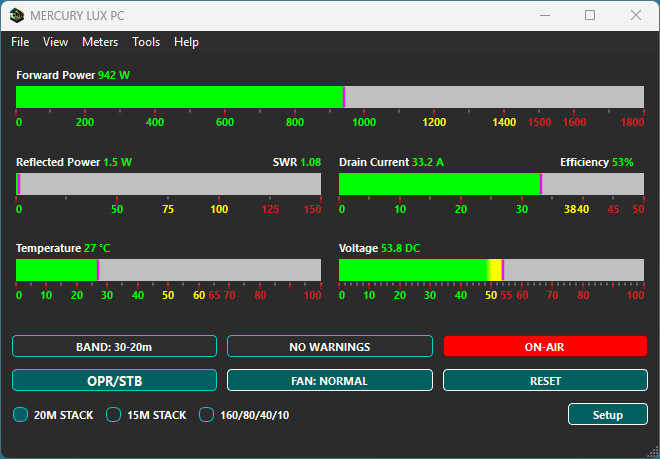
- Forward / Reflected Power, SWR, Return Loss
- Drain Voltage & Current, Temperature, Efficiency
- Band, Antenna, Fan, Standby/Operate, Alarms
- On-Air indicator (bold white text on red)
- PowerBar widgets with thresholds & color transitions
- Meter modes: Live, Peak, Hold, None
- EMA smoothing & SSB/CW-friendly cadence updates
Settings & UI
- Selectable units (Watts/dBm, °C/°F, etc.)
- Serial, WebSocket & TLS settings persisted
- Calibration values for power and current
- Hot-reload of settings at runtime
- Dark/Light theme support
- User-selectable app font (family/size/weight)
- Custom antenna labels (e.g. “Vertical”, “Hexbeam”)
Instance Management
- Run multiple instances for multiple amplifiers
- Each instance has isolated settings & state
- Instance number selectable on startup
Host-to-Amplifier Commands
- Request 8-part status string
- Enter / Exit standby (operate mode)
- Reset alarms
- Select ANT-1 / ANT-2 / ANT-3
- Set fan mode: normal or max
Hotkeys & Logging
- User-configurable hotkeys for common actions
- Optional global shortcuts (Win / macOS / X11)
- Log viewer dialog with real-time messages
- Clear log and filter by session
System Requirements
MercuryLuxPc is designed to run on modern desktop operating systems:
- Windows 10 / 11
- Linux (tested on Raspberry Pi-5 & Ubuntu)
- macOS
Installation
Windows
- Packaged as a Windows installer (
.exe). - Check the RF StateSide release page for downloadable builds.
- Run the setup executable and follow the wizard.
- Launch from the Start Menu or desktop shortcut.
- Uninstall via Settings → Apps → Installed Apps.
Linux
- Packaged as a compressed tarball (
.tar.gz). - Choose the correct build:
x86_64oraarch64(RPi-5). -
Extract & install:
tar -xzf MercuryLuxPc_<arch>.tar.gz cd MercuryLuxPc_<arch>/<arch>_<version>/MercuryLuxPc ./install.sh - Launch via desktop menu or
./run.sh. - Uninstall with
./uninstall.sh.
macOS
- Packaged as a disk image (
.dmg). - Download and open the
.dmg, then drag the app to Applications. - If Gatekeeper prompts, use “Open Anyway” in Security & Privacy.
- Launch from Launchpad or the Applications folder.
- Uninstall by deleting
MercuryLuxPc.app.
Development & TLS
Development Stack
- Qt Toolkit, recommended Qt 6.x (e.g., 6.7.3)
- C++17 or newer
- Compiler: MinGW 64-bit (on Windows)
- Key modules: QtCore, QtGui, QtWidgets, QtSerialPort, QtWebSockets
- For TLS support: OpenSSL runtime libraries + valid cert/key pair
Generating Self-Signed TLS Certificates
MercuryLuxPc includes a built-in TLS certificate generator:
- Use
Tools → Generate TLS Certificateinside the app. - Generates
server.crtandserver.keysuitable for TLS.
Alternatively, you can generate certs manually using OpenSSL:
openssl req -x509 -newkey rsa:2048 -keyout server.key ^
          -out server.crt -days 365 -nodes
License & Support
Recorded license information
Existing project notes identify MercuryLuxPc as licensed under the GNU Lesser General Public License v3.0 (LGPLv3). The notes describe dynamic linking against Qt libraries. Use the license supplied with your release; public source and license verification remain pending the individual project audit.
Note: MercuryLuxPc is an approved third-party application by KM3KM Electronics. Use of this application does not void the amplifier warranty.
Support & Contact
Developed by Ray Faucher (KB1SO).
- QRZ: KB1SO on QRZ (opens in a new tab)
- For bugs & feature requests: contact Ray
- For general discussion & feedback: RF StateSide Q&A
Your feedback helps improve MercuryLuxPc — thank you for testing, reporting, and sharing ideas!
Screenshot
Example GUI view of MercuryLuxPc monitoring a live Mercury LUX amplifier.
Interested in MercuryLuxPc?
If you operate a KM3KM Mercury LUX amplifier or would like to explore enhanced monitoring, calibration, or remote operation features, reach out. Feedback from active LUX operators helps guide future releases and improvements.